pyOCD Debugger
The pyOCD Debugger connects to CMSIS-DAP (for example ULINKplus) or ST-Link debug adapters. The CMSIS-Toolbox defines the debug configuration as part of the csolution project, ensuring consistent debug sessions across development teams, CI/CD environments, and different host platforms. This chapter describes how to use the pyOCD Debugger with the CMSIS-Toolbox.
- Extended Options explains additional configuration features that are required in specific use-cases.
- Minimal Setup explains how to create a
*.cbuild-run.ymlfile for a minimal pyOCD setup. - Command Line Invocation describes how to call pyOCD directly from the command-line.
cbuild-run:explains the configuration file that describes the overall pyOCD system setup.
Other manual sections describe how to configure debuggers:
- Run and Debug Configuration explains overall structure and how projects and images are configured.
- Debugger Configuration: pyOCD contains details about the options that are specific to pyOCD.
Extended Options
The section CSolution Project Format: pyOCD contains the pyOCD configuration for typical systems.
Extended YAML options are required to configure specific use-cases or overwrite information that is typically provided in the DFP.
CMSIS-DAP based Debug Adapters implement debug access sequences that are configured in the DFP for a device.
gdbserver:
gdbserver: |
Content | |
|---|---|---|
- port: |
Required | Set TCP/IP port number of GDB Server (default: 3333, 3334, ... incremented for each processor). |
pname: |
Optional | Identifies the processor (not required for single core system). |
Note
- When no
gdbservernode is applied, the default mechanism of incrementing port number starting with3333is used.
stdio:
pyOCD integrates a standard I/O service for character I/O functions via Semihosting or SEGGER RTT. Each processor that runs an independent application can be controlled individually.
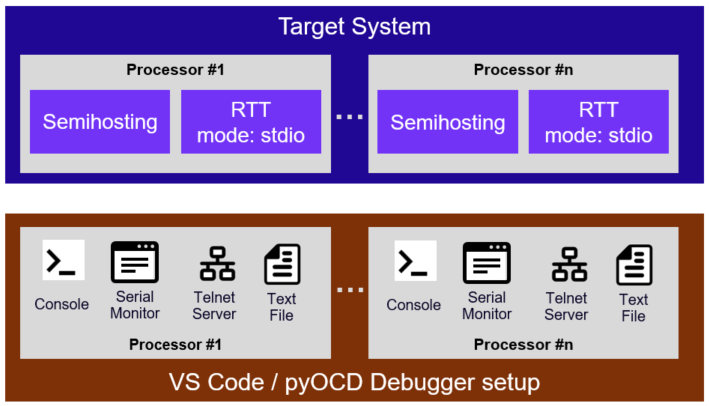
The stdio: node configures:
- Server port for connecting remote tools, for example the Serial Monitor VS Code extension.
- Redirect the output to a
file,console,server, ormonitor. The settingmonitorconnects a Telnet serverportto the Serial Monitor in VS Code. The default output file and location is derived from thecbuild-run.ymlfile and uses the extension<pname>.out, format:<solution-name>+<target-type>.<pname>.out
stdio: |
Description | |
|---|---|---|
- mode: |
Required | Redirect output: off (default), server, file, console, monitor. |
pname: |
Optional | Identifies the processor (not required for single core system). |
port: |
Optional | Set TCP/IP port number of Telnet Server (default: 4444, 4445, ... incremented for each processor). |
file-in: |
Optional | Explicit path and name of the input file. Default: ./out/\<solution-name\>+\<target-type\>.\<pname\>.in |
file-out: |
Optional | Explicit path and name of the output file. Default: ./out/\<solution-name\>+\<target-type\>.\<pname\>.out |
| Standard I/O Mode | Description |
|---|---|
server |
Serial I/O to Telnet server port. |
file |
Serial I/O to text files. Default: ./out/\<solution-name\>+\<target-type\>.\<pname\>.{in \| out} |
console |
Serial output to console (Debug console in VS Code). |
monitor |
Serial I/O via TCP/IP port to VS Code Serial Monitor. |
off |
Serial I/O disabled. |
Note
- When no
stdionode is applied, Serial I/O to all processors is disabled.
Info
- Use
stdio:for new configurations. The legacytelnet:node remains supported as an alias for backward compatibility.
The Arm CMSIS Solution extension for VS Code simplifies the configuration and the examples below show the setup in a *.csolution.yml file.
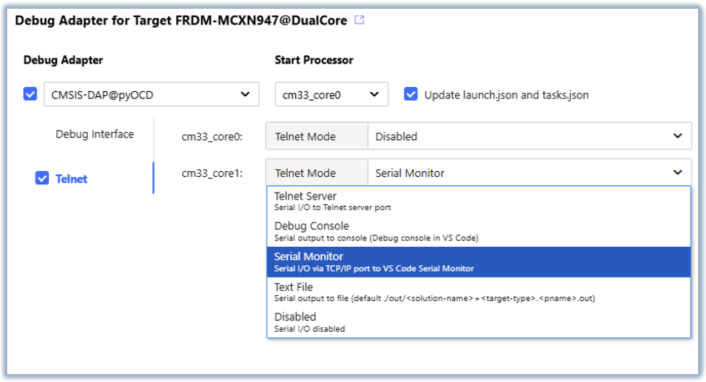
Examples:
Enable standard I/O service for a single core system.
debugger:
  name: CMSIS-DAP@pyOCD
  protocol: swd
  stdio:
    - mode: monitor          # Output via TCP/IP port to VS Code Serial Monitor
Enable standard I/O service for a single core system.
debugger:
  name: CMSIS-DAP@pyOCD
  protocol: swd
  stdio:
    - mode: server
Enable standard I/O service for a multi core system.
debugger:
  name: CMSIS-DAP@pyOCD
  protocol: swd
  stdio:
    - pname: Core0          # enable standard I/O service with default settings
      mode: server
      port: 4444
    - pname: Core1
      mode: console         # route standard I/O to console
    - pname: Core2
      mode: file            # route standard I/O to files
      file-in: Blinky+MyTarget.Core2.in
      file-out: Blinky+MyTarget.Core2.out
connect:
Configures the behavior for connecting pyOCD to the hardware target.
| Description | ||
|---|---|---|
connect: |
Optional | Selects the connect mode: pre-reset, under-reset, attach (default), halt. |
| Connect Mode | Description |
|---|---|
pre-reset |
Apply a hardware reset before connect. Sequence: ResetHardware. |
under-reset |
Asserts a hardware reset (Sequence: ResetHardwareAssert) during connect and deasserts (Sequence: ResetHardwareDeassert) after core(s) are halted. |
attach |
Do not change status of the core(s). |
halt |
Halt core(s) after connect. |
reset:
Configures the reset behavior for each core when a reset is requested.
reset: |
Description | |
|---|---|---|
- pname: |
Optional | Identifies the processor (not required for single core system). |
type: |
Required | Selects the reset type: hardware, system, core. Default: specified in DFP. |
| Reset Types | Description |
|---|---|
hardware |
Use a system-wide reset via dedicated debugger reset line. Sequence: ResetHardware. |
system |
Use a system-wide reset via software mechanism. Sequence: ResetSystem. |
core |
Use a processor reset via software mechanism. Sequence: ResetProcessor. |
Note
The defaultResetSequence in DFP element /package/devices/family/.../debug can define a different default reset type. If no defaultResetSequence, the default reset type is system.
load-setup:
Configures the debug sequences executed during the load command of pyOCD.
load-setup: |
Description | |
|---|---|---|
halt: |
Optional | Halt core(s) before load: on (default), off. |
pre-reset: |
Optional | Reset type before loading: off, hardware, system, core. Default: specified in DFP or defined with reset. |
post-reset: |
Optional | Reset type after loading: off, hardware (default), system, core. |
Examples:
debugger:
  name: CMSIS-DAP@pyOCD     # default connect, halt and reset behavior
debugger:
  name: CMSIS-DAP@pyOCD
  connect: under-reset      # connect under hardware reset
  reset:
    - type: system          # use system reset
  load-setup:
    halt: on                # halt core(s) before load
    post-reset: hardware    # use hardware reset after load
debugger:
  name: CMSIS-DAP@pyOCD
  connect: pre-reset        # apply hardware reset before connect
  reset:
    - pname: Core0          # for Core0
      type: hardware        # use hardware reset
    - pname: Core1          # for Core1
      type: system          # use system reset
  load-setup:
    pre-reset: system       # use system reset before load
    post-reset: off         # no reset after load
rtt:
RTT is a software component that implements real-time transfer channels from the target system to the pyOCD Debugger for multiple processors.
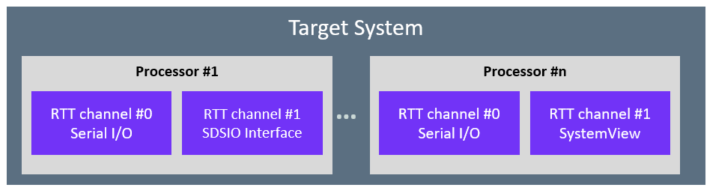
The rtt: node configures the RTT features and the RTT channel usage. At least one RTT channel must be configured for each processor to enable the RTT capturing in pyOCD.
Note
RTT is currently only enabled when using the pyOCD run command. It will be added in future pyOCD versions to the gdbserver.
rtt: |
Description | |
|---|---|---|
- pname: |
Optional | Processor identifier (not required for single-core systems). |
control-block: |
Optional | RTT control block configuration. |
channel: |
Required | Channel configuration. |
control-block:
The control-block: node configures the RTT control block discovery in pyOCD.
control-block: |
Description | |
|---|---|---|
auto-detect: |
Optional | Scan default memory regions for the RTT control block signature: true, false (default). |
address: |
Optional | Explicit control block address; when combined with size, acts as scan start address. |
size: |
Optional | Scan length in bytes when address is provided. |
pyOCD discovers the RTT control block using the prioritized steps for each core on the target:
control-block:provides an explicitaddress::
a.size:is provided: pyOCD scans that memory range.
b.size:is not provided: pyOCD checks the provided explicit address.- When
auto-detect: truepyOCD scans default memory region (RAM) for the RTT control block signature. If multiple regions are marked as default, the region with the lowest start address is selected. - When
control-block:is empty or not specified, pyOCD checks the ELF file for the symbol_SEGGER_RTTthat specifies the control block location.
If the RTT control block cannot be found, RTT will be disabled for that core.
channel:
The channel: node selects the RTT channel mode.
channel: |
Description | |
|---|---|---|
- number: |
Required | Channel number. |
mode: |
Required | Channel mode selection: stdio, server, file, systemview, systemview-server. |
port: |
Optional | TCP port number (required for server and systemview-server). |
file-out: |
Optional | Path of the file that receives data from the RTT channel. Applies to file mode. Default: <target>[_core<core>]_ch<channel>.out. |
file-in: |
Optional | Path of the file that sends data to the RTT channel. Applies to file mode. Default: <target>[_core<core>]_ch<channel>.in; input is disabled when the file does not exist. |
| Channel Mode | Description |
|---|---|
stdio |
Connects channel to standard I/O service that is configured via the stdio: node. |
server |
Exposes channel over a TCP server port. |
file |
Routes RTT channel data to and from files. |
systemview |
Saves channel data to *.SVDat file for SEGGER SystemView tool. Default file: ./out/<solution-name>+<target-type>.SVDat; see systemview: node. |
systemview-server |
Streams live data to SEGGER SystemView tool over a "IP Recorder host" TCP port. Refer to the SEGGER SystemView user guide, IP Recorder. |
Examples:
Enable RTT with standard I/O on channel 0 and configure explicit control block:
debugger:
  name: CMSIS-DAP@pyOCD
  protocol: swd
  rtt:
    - pname: Core0
      control-block:
        address: 0x20000000
        size: 0x00020000
      channel:
        - number: 0
          mode: stdio
Enable RTT with standard I/O on channel 0 and map RTT channel 2 to a Telnet Server port 4444 and channel 3 to a Telnet Server port 4445:
debugger:
  name: CMSIS-DAP@pyOCD
  protocol: swd
  rtt:
    - pname: Core0
      channel:
        - number: 0
          mode: stdio
        - number: 2
          mode: server
          port: 4444
        - number: 3
          mode: server
          port: 4445
Map RTT channel 2 to input and output files:
debugger:
  name: CMSIS-DAP@pyOCD
  protocol: swd
  rtt:
    - pname: Core0
      channel:
        - number: 2
          mode: file
          file-out: ./out/Blinky.out
          file-in: ./out/Blinky.in
systemview:
The systemview: node configures the *.SVDat file capturing for SEGGER SystemView tool for analyzing the runtime behavior of embedded systems.
systemview: |
Description | |
|---|---|---|
file: |
Optional | SystemView capture file. Default: ./out/<solution-name>+<target-type>.SVDat (derived from *.cbuild-run.yml). |
auto-start: |
Optional | Send SystemView start command automatically: true (default), false. |
auto-stop: |
Optional | Send SystemView stop command automatically: true (default), false. |
Examples:
Configure SystemView capture on channel 1:
debugger:
  name: CMSIS-DAP@pyOCD
  protocol: swd
  rtt:
    - pname: Core0
      channel:
        - number: 1
          mode: systemview
  systemview:                      # explicit SystemView output file
    file: ./out/MyFile.SVDat
trace:
Note
The trace: feature is under development. This section provides a preview.
CMSIS-DAP supports the SWO trace output of Cortex-M devices. The raw trace data are made available from pyOCD through a TCP connection or a binary file.
Device-specific trace capture capabilities are configured using the device-settings node under debugger:.
The trace: node has one child type per supported trace transport mode which offers mode-specific options. Currently, the swo-uart type and the trace-buffer type are supported.
The default trace output file and location is derived from the cbuild-run.yml file. It
is located in the solution's .trace/ sub-folder and uses the format <solution-name>+<target-type>@<target-set>.<channel>.raw.
The <channel> part is derived from the type node as it follows.
| Type node | <channel> |
|---|---|
- swo-uart: |
SWO |
- trace-buffer: |
TB |
Note
The trace: node is implemented as a list. However, currently only one node is supported. Additional nodes are ignored.
trace:
  - swo-uart:                 # Trace mode is SWO UART
    input-clock: 120000000    # Trace clock = 120 MHz
swo-uart
Configuration for the SWO trace output in UART mode.
trace: |
Description | |
|---|---|---|
- swo-uart: |
Required | Transport mode is SWO UART. This node does not have a value. |
mode: |
Optional | Trace: off (default), server, file. |
server-port: |
Optional | Set TCP/IP port number of trace server in server mode (default: 5555). |
file: |
Optional | Explicit path and name of the trace output file in file mode. Default: <solution-name>+<target-type>@<target-set>.SWO.raw. |
input-clock: |
Required | Trace input clock frequency in Hz. |
output-clock: |
Optional | Trace output clock frequency, i.e. the baudrate, for the SWO output. |
trace-buffer
Configuration for the target device trace buffer. This type covers on-chip trace buffer variants like the Embedded Trace Buffer (ETB), the Embedded Trace FIFO (ETF, in circular buffer mode), the Embedded Trace Router, and the Micro Trace Buffer (MTB).
Some of the listed on-chip trace buffer solutions provide sophisticated options to configure exact memory placement and bus access setup.
Such settings are often use-case and device specific. They are usually exposed through the device <debugvars>,
and configured through the device-settings: or the *.dbgconf file.
trace: |
Description | |
|---|---|---|
- trace-buffer: |
Required | Transport mode is (on-chip) trace buffer. See Selecting Trace Buffers for value rules. |
mode: |
Optional | Trace: off (default), server, file. |
server-port: |
Optional | Set TCP/IP port number of trace server in server mode (default: 5555). |
file: |
Optional | Explicit path and name of the trace output file in file mode. Default: <solution-name>+<target-type>@<target-set>.TB.raw. |
Trace Clocks
- Trace
input-clockis the frequency of the clock signal that goes into the trace port component. It equals the CPU clock frequency for the majority of systems with trace from a single core. For more complex multi-core systems, the clock is normally derived from the system clock. Refer to the device manual and setup to find the exact value. - Trace
output-clockis the clock frequency of the trace output signal. It is used to configure trace capture of the debug unit, and to calculate trace port prescaler values that need to be programmed. If not provided or if the value is0, then a best matching output frequency is automatically calculated based oninput-clock, supported trace capture frequencies/baudrates of the debug unit, and other potentially known device-specific constraints like pin characteristics.
Debug Access Variables
The above configurations are passed to debug sequence implementations through pre-defined debug access variables. The following mapping is expected:
input-clockdirectly maps to variable__traceclockin.- If
output-clockis provided and has a value other than0, then the value directly maps to variable__traceclockout. - If
output-clockis not provided or has the value0, then the highest achievable output clock frequency supported by the debug unit is written to__traceclockout. - The selected transport mode (currently
swo-uartortrace-buffer) maps to bits0..2of variable__traceout.
device-settings:
Note
The device-settings: feature is under development. This section provides a preview.
Debug and trace connection sequences are often device-specific and can be configured. This node contains a list of editable key-value pairs which are based on debug access variables defined in the device <debugvars> section in a PDSC file.
The device-settings: node has higher precedence than the dbgconf: node, i.e. if device-settings: is present then an also specified *.dbgconf file is ignored.
If a *.csolution.yml specifies a dbgconf: node instead of a device-settings: node, then the referenced *.dbgconf file gets parsed and its contents is converted into a device-settings: node in the *.cbuild-run.yml file.
Note
- Settings that are not assigned under the
device-settings:node or the referenced*.dbgconffile default to the values assigned in the device's<debugvars>section of the PDSC file.
Example: MySetup.csolution.yml
  debugger:
    name: ST-Link@pyOCD
    protocol: swd
    clock: 10000000
    dbgconf: .cmsis/Blinky+STM32H747I-EVAL.dbgconf
    start-pname: CM7
    gdbserver:
      - port: 3333
        pname: CM7
      - port: 3334
        pname: CM4
Example: MySetup.cbuild-run.yml generated from MySetup.csolution.yml
  debugger:
    name: ST-Link@pyOCD
    protocol: swd
    clock: 10000000
    start-pname: CM7
    gdbserver:
      - port: 3333
        pname: CM7
      - port: 3334
        pname: CM4
    device-settings:
      # DBGMCU configuration register (DBGMCU_CR)
      DbgMCU_CR: 0x00000007
      # TPIU Pin Routing (TRACECLK fixed on Pin PE2)
      TraceD0_Pin: 0x00040003  # Pin PE3
      TraceD1_Pin: 0x00040004  # Pin PE4
      TraceD2_Pin: 0x00040005  # Pin PE5
      TraceD3_Pin: 0x00040006  # Pin PE6
Minimal Setup
pyOCD uses the information from the CMSIS system as explained under Build Information Files: Run and Debug Management. The following section shows a minimal setup for configuring pyOCD using a *.cbuild-run.yml file.
Example: MySetup.csolution.yml
solution:
  packs:
    - pack: Infineon::PSE8xxx_DFP@1.0.1     # Device Family Pack (DFP)

  target-types:
    - type: PSE8_Target                     # Target name
      device: PSE812GOS2DFNC4B              # Device name from DFP
      target-set:
        - set:
          images:
            - image: out/MyFile.hex         # Image files used
          debugger:
            name: CMSIS-DAP@pyOCD           # Debugger configuration
            clock: 10000000
            protocol: swd
To generate the related *.cbuild-run.yml file for pyOCD run the following CMSIS-Toolbox commands:
cpackget add Infineon::PSE8xxx_DFP@1.0.1
cbuild setup MySetup.csolution.yml --active PSE8_Target
This creates the file out/MySetup+PSE8_Target.cbuild-run.yml that can be used for the command line invocation.
Command Line Invocation
The CMSIS-Toolbox debugger setup is provided in the file *.cbuild-run.yml. The *.cbuild-run.yml file is generated by the CMSIS-Toolbox build process and uses the Debugger Configuration that is part of the csolution project. Minimal Setup shows how to create a setup for a stand-alone image file.
Use the following command line syntax to leverage this information:
>pyocd <command> [--probe <probe>] [--uid <uid>] [options] --cbuild-run <cbuild-run.yml file>
<command> |
Description |
|---|---|
gdbserver |
Start GDB server(s). |
run |
Execute application. |
erase |
Erase device. |
load |
Load image to device. |
reset |
Reset device. |
[options] |
Description |
|---|---|
--probe |
Specify the probe type (cmsisdap: or jlink:). |
--uid |
Specify the ID or serial number of a debug probe. |
Info
When only one probe is connected to the host computer, --probe and --uid can be omitted.
Example:
Connect to a specific probe on the host computer.
pyocd load --probe cmsisdap: --uid XP0GA4C42ZQAA --cbuild-run c:\Test\Dec11\DualCore\out\DualCore+FRDM-MCXN947.cbuild-run.yml
gdbserver
Start GDB servers for each target device core, used for debugging the applications.
<options> |
Description |
|---|---|
--semihosting |
Enable semihosting (default: disabled). |
--persist |
Keep GDB server running even after remote has detached (default: disabled). |
--reset-run |
Reset and run before running GDB server. |
Example:
pyocd gdbserver --persist --reset-run --semihosting --cbuild-run out/DualCore+Alif-AppKit-E7.cbuild-run.yml
run
Run the target until timelimit is reached or an EOT (0x04) character is detected on stdout.
<options> |
Description |
|---|---|
--timelimit <sec> |
Maximum execution time in seconds before terminating (default: no time limit). |
--eot |
Terminate execution when EOT character (0x04) is detected on stdout (default: disabled). |
Example:
pyocd run --cbuild-run out/DualCore+Alif-AppKit-E7.cbuild-run.yml --eot --timelimit 30
erase
Erase target using chip erase.
<options> |
Description |
|---|---|
--chip |
Perform a chip erase. |
Note
Currently erase without --chip option is not supported.
Example:
pyocd erase --chip --cbuild-run out/DualCore+Alif-AppKit-E7.cbuild-run.yml
load
Program target with images listed under the output: node.
Example:
pyocd load --cbuild-run out/DualCore+Alif-AppKit-E7.cbuild-run.yml
reset
Reset target using selected reset: type.
Example:
pyocd reset --cbuild-run out/DualCore+Alif-AppKit-E7.cbuild-run.yml
Content of *.cbuild-run.yml
This section details the content of *.cbuild-run.yml file and how it is used to configure pyOCD. The *.cbuild-run.yml
file is generated by the CMSIS-Toolbox from the information provided in the csolution project.
However, it is possible to create a *.cbuild-run.yml file manually and the following section explains
the file structure.
cbuild-run:
The top-level cbuild-run: node identifies the file as a *.cbuild-run.yml file. All Run and Debug configuration nodes
are nested under this node. The table below is an excerpt of the full File Structure of *.cbuild-run.yml
configuration and highlights the nodes relevant to pyOCD. The contents of each node are described in the following sections.
cbuild-run: |
Content | |
|---|---|---|
board-pack: |
Optional | Identifies the board pack used. |
board-pack-path: |
Optional | Path to the board pack on the host computer. |
device: |
Required | Identifies the device. |
device-pack: |
Optional | Identifies the device pack used. |
device-pack-path: |
Optional | Path to the device pack on the host computer. |
output: |
Optional | Lists the images (ELF, HEX, BIN) in this solution. |
system-resources: |
Optional | Lists target system resources. |
system-descriptions: |
Optional | Lists target's description files for peripherals and software components. |
debugger: |
Optional | Configures the debugger. |
debug-vars: |
Optional | Debug variables. |
debug-sequences: |
Optional | Debug sequences. |
programming: |
Optional | Lists flash algorithms for programming. |
flash-info: |
Optional | Lists flash information for flash programming using debug sequences. |
debug-topology: |
Optional | Debug topology. |
board-pack:
The board-pack (BSP) improves pyOCD's error reporting when a required file is provided by the board pack.
Example:
board-pack: Keil::B-U585I-IOT02A_BSP@2.1.0
board-pack-path:
The board-pack-path defines the path to the board pack (BSP) on the host computer.
Example:
board-pack-path: ${CMSIS_PACK_ROOT}/Keil/B-U585I-IOT02A_BSP/2.1.0
device:
pyOCD uses the device node to name the target in the current debug session. The node value is structured as
[<vendor>::]<device>[:<pname>], where only the <device> part is used to name the target. The default value
is an empty string.
Example:
device: Alif Semiconductor::AE722F80F55D5LS
device-pack:
The device-pack (DFP) improves pyOCD's error reporting when a required file is provided by the device pack.
Example:
device-pack: AlifSemiconductor::Ensemble@2.0.4
device-pack-path:
The device-pack-path defines the path to the device pack (DFP) on the host computer.
Example:
device-pack-path: ${CMSIS_PACK_ROOT}/AlifSemiconductor/Ensemble/2.0.4
output:
pyOCD uses the information from the output: node to determine which images need to be loaded into the device's
flash memory and at what addresses. The image file type is determined by the type: node, and the load offset
for binary image files is provided by the load-offset: node. Only files with image in the load: node are
programmed to the device.
output: |
Content | |
|---|---|---|
- file: |
Required | Specifies the file name. |
type: |
Required | Specifies the file type. |
info: |
Optional | Brief description of the file. |
load: |
Required | Load mode of the image file for programmers and debug tools. |
load-offset: |
Optional | Offset applied in *.csolution.yml when loading the binary image file. |
pname: |
Optional | Image belongs to processor in a multi-core system. |
Example:
  output:
    - file: M55_HP/Alif-AppKit-E7/Debug/M55_HP.axf
      info: generated by M55_HP.Debug+Alif-AppKit-E7
      type: elf
      load: image+symbols
      pname: M55_HP
    - file: M55_HE/Alif-AppKit-E7/Debug/M55_HE.axf
      info: generated by M55_HE.Debug+Alif-AppKit-E7
      type: elf
      load: symbols
      pname: M55_HE
    - file: M55_HE/Alif-AppKit-E7/Debug/M55_HE.hex
      info: generated by M55_HE.Debug+Alif-AppKit-E7
      type: hex
      load: image
      pname: M55_HE
    - file: M55_HE/Alif-AppKit-E7/Debug/M55_HE.bin
      info: generated by M55_HE.Debug+Alif-AppKit-E7
      type: bin
      load: none
      pname: M55_HE
system-resources:
Contains a list of memory regions that pyOCD uses to build the device memory map. A default Cortex-M memory map is used
as the baseline and is then updated with the information provided in the memory: node. If no memory regions are specified,
pyOCD falls back to the default Cortex-M memory map.
system-resources: |
Content | |
|---|---|---|
memory: |
Optional | Identifies the section for memory. |
memory: |
Content | |
|---|---|---|
- name: |
Required | Name of the memory region (when PDSC contains id, it uses the id as name). |
access: |
Required | Access attribute string for the memory (see access: table here). |
start: |
Required | Base address of the memory. |
size: |
Required | Size of the memory. |
pname: |
Optional | Only accessible by a specific processor. |
alias: |
Optional | Name of identical memory exposed at a different address. |
default: |
Optional | Indicates a general purpose memory region. |
Default Cortex-M memory map:
  system-resources:
    memory:
      - name: Code
        access: rx
        start: 0x00000000
        size: 0x20000000
      - name: SRAM
        access: rwx
        start: 0x20000000
        size: 0x20000000
      - name: Peripherals
        access: rwp
        start: 0x40000000
        size: 0x20000000
      - name: RAM1
        access: rwx
        start: 0x60000000
        size: 0x20000000
      - name: RAM2
        access: rwx
        start: 0x80000000
        size: 0x20000000
      - name: Devices-Shareable
        access: rwp
        start: 0xA0000000
        size: 0x20000000
      - name: Devices-NonShareable
        access: rwp
        start: 0xC0000000
        size: 0x20000000
      - name: System-Peripherals
        access: rwp
        start: 0xE0000000
        size: 0x20000000
Example:
  system-resources:
    memory:
      - name: ITCM_HE
        access: rwx
        start: 0x00000000
        size: 0x00040000
        pname: M55_HE
        alias: SRAM4
      - name: ITCM_HP
        access: rwx
        start: 0x00000000
        size: 0x00040000
        pname: M55_HP
        alias: SRAM2
      - name: MRAM
        access: rx
        start: 0x80000000
        size: 0x00580000
        default: true
      - name: SRAM2
        access: rwx
        start: 0x50000000
        size: 0x00040000
      - name: SRAM4
        access: rwx
        start: 0x58000000
        size: 0x00040000
system-descriptions:
Contains a list of system description files for the target's peripherals and software components. The svd files are
processed by pyOCD to present debug views and decode register reads/writes.
system-descriptions: |
Content | |
|---|---|---|
- file: |
Required | Specifies the file name including the path. |
type: |
Required | Specifies the file type (see table below). |
info: |
Optional | Brief description of the file. |
pname: |
Optional | File is used only for a specific processor; default is for all processors. |
type: |
Description |
|---|---|
svd |
System View Description (*.svd) file specified in the DFP. |
Note
Currently pyOCD has a limitation of only processing the svd file for the processor listed in start-pname:.
Example:
  system-descriptions:
    - file: ${CMSIS_PACK_ROOT}/AlifSemiconductor/Ensemble/2.0.4/Debug/SVD/AE722F80F55D5LS_CM55_HE_View.svd
      type: svd
      pname: M55_HE
    - file: ${CMSIS_PACK_ROOT}/AlifSemiconductor/Ensemble/2.0.4/Debug/SVD/AE722F80F55D5LS_CM55_HP_View.svd
      type: svd
      pname: M55_HP
debugger:
Contains the user's debugger configuration settings. The available options are described in detail in the CSolution Project Format section Debugger Configuration: pyOCD and pyOCD Debugger Extended Options.
Example:
  debugger:
    name: CMSIS-DAP@pyOCD
    protocol: swd
    clock: 10000000
    start-pname: M55_HP
    connect: attach
    reset:
      - type: system
        pname: M55_HP
      - type: core
        pname: M55_HE
    gdbserver:
      - port: 3333
        pname: M55_HP
      - port: 3334
        pname: M55_HE
    stdio:
      - mode: console
        pname: M55_HE
        port: 4445
      - mode: monitor
        pname: M55_HP
        port: 4444
debug-vars:
Contains the definition and default values for debug sequence variables. The default values can be overridden by corresponding key-value pairs under the device-settings: node under debugger:.
debug-vars: |
Content | |
|---|---|---|
vars: |
Optional | Initial values for variables used in debug-sequences:. |
Example:
  debug-vars:
    vars: |
      // Default values for variables in debug sequences. Can be configured with a *.dbgconf file in the user project
      __var SWO_Pin               = 0;                    // Serial Wire Output pin: 0 = PIO0_10, 1 = PIO0_8
      __var Dbg_CR                = 0x00000000;           // DBG_CR
      __var BootTime              = 10000;                // 10 milliseconds
debug-sequences:
Contains debug sequences
from the DFP for the target. A sequence with no blocks: disables the default sequence; sequence names can override
default sequences from the DFP.
debug-sequences: |
Content | |
|---|---|---|
- name: |
Required | Name of the sequence. |
info: |
Optional | Descriptive text to display for example for error diagnostics. |
blocks: |
Optional | A list of command blocks in order of execution. |
pname: |
Optional | Executes sequence only for a specific processor; default is for all processors. |
blocks: |
Content | |
|---|---|---|
- info: |
Optional | Descriptive text to display for example for error diagnostics. |
blocks: |
Optional | A list of command blocks in the order of execution. |
execute: |
Optional | Commands for execution. |
atomic: |
Optional | Atomic execution of commands; cannot be used with blocks:. |
if: |
Optional | Only executed when expression is true. |
while: |
Optional | Executed in loop until while expression is true. |
timeout: |
Optional | Timeout value (integer) in milliseconds for while loop. |
Example:
  debug-sequences:
    - name: DisableWarmResetHandshake
      blocks:
        - execute: |
            Write32(0x1A601024, 0);
      pname: M55_HE
    - name: DisableWarmResetHandshake
      blocks:
        - execute: |
            Write32(0x1A600024, 0);
      pname: M55_HP
    - name: DebugDeviceUnlock
      blocks:
        - execute: |
            DAP_Delay(500000);  // Delay for 500ms
    - name: ResetSystem
      blocks:
        - execute: |
            Sequence("DisableWarmResetHandshake");
        - execute: |
            // System Control Space (SCS) offset as defined in Armv6-M/Armv7-M.

            __var SCS_Addr   = 0xE000E000;
            __var AIRCR_Addr = SCS_Addr + 0xD0C;
            __var DHCSR_Addr = SCS_Addr + 0xDF0;

            // Execute SYSRESETREQ via AIRCR
            Write32(AIRCR_Addr, 0x05FA0004);
        - while: (Read32(DHCSR_Addr) & 0x02000000)
          timeout: 500000
programming:
Contains a list of the target's flash programming algorithms. pyOCD uses these algorithms to identify which memory regions should be treated as flash, and it will automatically select the appropriate algorithm when programming flash on the target.
programming: |
Content | |
|---|---|---|
- algorithm: |
Required | Programming algorithm file including the path. |
start: |
Required | Start address of memory covered by the programming algorithm. |
size: |
Required | Size of memory covered by the programming algorithm. |
ram-start: |
Required | Start address of RAM where the algorithm will be executed from. |
ram-size: |
Required | Maximum size of RAM available for executing the programming algorithm. |
pname: |
Optional | Specifies the processor for the execution of the algorithm. |
Example:
  programming:
    - algorithm: ${CMSIS_PACK_ROOT}/AlifSemiconductor/Ensemble/2.0.4/Flash/algorithms/Ensemble.FLM
      start: 0x80000000
      size: 0x00580000
      ram-start: 0x00000000
      ram-size: 0x00020000
    - algorithm: ${CMSIS_PACK_ROOT}/AlifSemiconductor/Ensemble/2.0.4/Flash/algorithms/Ensemble_IS25WX256.FLM
      start: 0xC0000000
      size: 0x02000000
      ram-start: 0x00000000
      ram-size: 0x00040000
flash-info:
Contains a list of target's flash memories information, which is used by pyOCD to determine which memory regions should be treated as flash and how to program them using flash debug sequences.
flash-info: |
Content | |
|---|---|---|
- name: |
Required | Name of the specified flash device. |
start: |
Required | Base address of the memory. |
page-size: |
Required | Page size. A page is the smallest unit that can be programmed. |
blocks: |
Required | List of blocks. A block is the smallest unit that can be erased. |
blank-val: |
Optional | 64-bit value in erased memory (default 0xFFFFFFFFFFFFFFFF). Value is truncated to match the access size. |
fill-val: |
Optional | 64-bit value that a debugger uses to fill the remainder of a page (default 0xFFFFFFFFFFFFFFFF). Value is truncated to match the access size. |
ptime: |
Optional | Timeout in milliseconds for programming a page (default 300). |
etime: |
Optional | Timeout in milliseconds for erasing a block (default 300). |
pname: |
Optional | Executes programming only for a specific processor (default for all processors). |
blocks: |
Content | |
|---|---|---|
- count: |
Required | Number of blocks. |
size: |
Required | Block size in bytes. Total memory size (in bytes) is size * count. |
arg: |
Optional | Optional value that a debugger writes to the pre-defined debug access variable __FlashArg at start of a flash operation (default 0). |
Note
- The
gapelement is not used.
Example:
  flash-info:
    - name: Internal Flash (code) 64KB
      start: 0x00000000
      page-size: 0x00000040
      blocks:
        - count: 256
          size: 0x00000100
          arg: 0
      blank-val: 0x00000000FFFFFFFF
      ptime: 100000
      etime: 1000000
debug-topology:
Describes the properties of the system hardware for debug functionality. The information for this node is taken from
the DFP. If the information is not provided in the *.cbuild-run.yml file, pyOCD will use the default values described below.
debug-topology: |
Content | |
|---|---|---|
debugports: |
Optional | Describes the CoreSight debug ports of the device and its capabilities. |
processors: |
Optional | Map of pname identifiers to access port IDs (mandatory for multi-processor devices). |
trace-sinks: |
Optional | Trace sinks supported by the device. |
swj: |
Optional | Device allows switching between Serial Wire Debug (SWD) and JTAG protocols (true or false). |
dormant: |
Optional | Device requires the dormant state to switch debug protocols (true or false). |
debugports: |
Content | |
|---|---|---|
- dpid: |
Required | Unique ID of this debug port. |
accessports: |
Optional | List of CoreSight access ports (APv1/APv2) (mandatory for multi-processor devices). |
accessports: |
Content | |
|---|---|---|
- apid: |
Required | Unique ID of this access port. If only apid is provided, access port (APv1) with index 0 will be implicitly used. |
index: |
Optional | Index to select this access port (APv1) for a target access. |
address: |
Optional | Address to select this access port (APv2) in its parent's address space for a target access. |
Note
index: and address: cannot be specified at the same time.
processors: |
Content | |
|---|---|---|
- pname: |
Required | Processor identifier (mandatory for multi-processor devices). |
apid: |
Optional | Access port ID to use for this processor. |
reset-sequence: |
Optional | Name of debug sequence for reset operation (default: ResetSystem sequence). |
trace-sinks: |
Content | |
|---|---|---|
- <trace-sink-type>: |
Required | Trace sink type: serialwire or tracebuffer. |
trace-sinks: lists device trace sinks from the DFP trace element. serialwire has no value. A tracebuffer value is its optional PDSC name attribute and becomes mandatory when multiple trace buffers exist.
pyOCD uses this information to verify that a trace type is supported and that a selected named trace buffer exists.
Default values:
debug-topology:
  dormant: false
  swj: true
  debugports:
    - dpid: 0
      accessports:
        - apid: 0
          index: 0
  trace-sinks:
    - serialwire:
    - tracebuffer:
Example:
  debug-topology:
    dormant: true
    debugports:
      - dpid: 0
        accessports:
          - apid: 0
            address: 0x00200000
          - apid: 1
            address: 0x00300000
    processors:
      - pname: M55_HP
        apid: 0
      - pname: M55_HE
        apid: 1
    trace-sinks:
      - serialwire:
      - tracebuffer: ETF
      - tracebuffer: MTB
Debug Access Sequence Usage for pyOCD Commands
The sequence diagrams below show the usage of the debug access sequences for pyOCD commands. The specification Open-CMSIS-Pack: Usage of debug access sequences describes the following sequence blocks. pyOCD uses these concepts, but implements these deviations:
- Connect Debugger to Device:
- For the
connect:modeattach, no reset or halt operations are issued. - For multi-processor systems, only the following blocks are executed once per processor core: Read Target Features, DebugCoreStart, Stop Processor / ResetCatchSet, Wait for Processor to Stop, and Initialize Debug Components. The remaining diagram elements run once for the device as a whole. This distinction is important for multi-core targets, where some blocks run once per core and others run once for the device.
- For the
Info
Sequence Blocks in the diagrams below link to the Open-CMSIS-Pack specification that provides further details.